
Download Pr co – newsroom, publishing & collaboration tool for PR teams
Overview
Pr co is a cloud‑based newsroom and publishing platform designed specifically for public‑relations professionals, advertising agencies, and marketing teams that need a secure, real‑time environment for creating, distributing, and measuring press content. The software lets you set up a branded newsroom, write news posts and press releases, and publish them directly to your website or email list. What really sets Pr co apart is its built‑in workflow engine: you can assign roles, set deadlines, and approve or edit drafts from anywhere in the world. Whether you manage a handful of writers or coordinate a global network of freelancers, Pr co provides a single dashboard where you can monitor every piece of content, track analytics, and keep your brand’s voice consistent. The platform also supports press‑kit creation, media clipping archives, and snippet sharing, making it a comprehensive hub for any organization that wants to turn newsrooms into strategic distribution channels.
Key Features & Capabilities
- Customizable Newsroom: Build a fully branded newsroom with drag‑and‑drop widgets, SEO‑friendly URLs, and responsive design that works on desktop and mobile.
- Collaborative Writing: Multiple writers can work on the same release, leave comments, and see real‑time edits, similar to Google Docs but within a secure PR environment.
- Role‑Based Permissions: Assign “Writer,” “Editor,” “Publisher,” or “Administrator” roles, ensuring only authorized users can approve or push content live.
- Task Management & Deadlines: The Collaborate add‑on lets managers set tasks, attach due dates, and receive automatic reminders.
- Press‑Kit Builder: Compile PDFs, images, videos, and backgrounders into a single downloadable kit for journalists.
- Media Clipping Archive: Store and organize media mentions, allowing quick retrieval for reporting or audit purposes.
- Snippet Distribution: Share teaser snippets of upcoming releases via social media or email to generate buzz before the full launch.
- Real‑Time Analytics: Track opens, clicks, and geographic reach of each distribution, with exportable CSV reports.
- Integration Hub: Connect with popular email platforms (Mailchimp, SendGrid), CRM systems (HubSpot, Salesforce), and social tools (Hootsuite, Buffer).
- Secure Cloud Hosting: Data is encrypted at rest and in transit, meeting GDPR and CCPA compliance standards.
Installation, Setup & Daily Usage
Because Pr co is a SaaS solution, there is no traditional “installation” process. You simply create an account on the Pr co website, choose a subscription plan, and start configuring your newsroom from within a web browser. The onboarding wizard walks you through the following steps:
- Create Your Account: Sign up with a corporate email, verify your domain, and set a strong password. Two‑factor authentication can be enabled for added security.
- Brand Your Newsroom: Upload your logo, select brand colors, and customize the homepage layout. Pr co automatically generates SEO‑friendly meta tags based on your inputs.
- Add Users & Roles: Invite writers, editors, and external contributors. Assign role‑based permissions to control who can draft, edit, or publish content.
- Set Up Workflows: Define the approval path (e.g., Writer → Editor → Publisher) and configure automated email notifications for each stage.
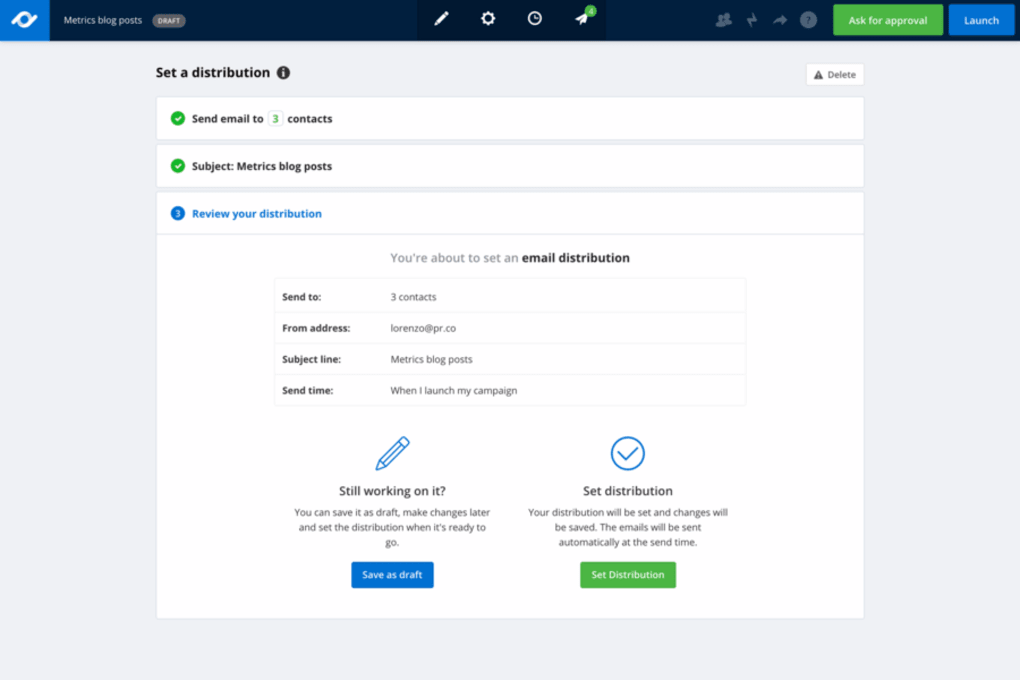
- Connect Distribution Channels: Link your email marketing service, CRM, and social media accounts. Map fields so that press releases automatically populate your mailing lists.
- Publish Your First Release: Use the built‑in rich‑text editor to write a news post, attach multimedia, and preview how it will appear on your website. When you’re ready, hit “Publish” or schedule for a future date.
- Monitor Results: Access the Analytics tab to see real‑time metrics, export reports, and adjust your distribution strategy based on audience engagement.
For teams that need to collaborate offline, Pr co offers a desktop companion app for Windows and macOS that syncs with the cloud whenever an internet connection is available. The mobile apps for Android and iOS let editors approve releases on the go, ensuring deadlines are never missed.
Compatibility
Pr co runs entirely in modern browsers (Chrome, Edge, Firefox, Safari) and is fully compatible with Windows 10/11, macOS 10.15 and later, as well as iOS 13+ and Android 8+. Because the platform is web‑based, there is no need for separate installations on each device, and updates are applied automatically without user intervention.
Pros, Cons & Frequently Asked Questions
Pros
- All‑in‑one newsroom, publishing, and workflow management solution.
- Robust role‑based permissions keep content secure.
- Real‑time collaboration reduces turnaround time for press releases.
- Built‑in analytics give immediate insight into distribution performance.
- Integrates seamlessly with major email, CRM, and social platforms.
- Cloud‑hosted with GDPR/CCPA compliance ensures data privacy.
Cons
- Pricing may be higher than basic publishing tools for small freelance PR consultants.
- Learning curve for teams unfamiliar with workflow automation.
- No on‑premise deployment option for highly regulated industries.
- Advanced features (e.g., Collaborate add‑on) require higher‑tier plans.
FAQ
Is Pr co a free tool?
Pr co offers a 14‑day free trial that includes all core features. After the trial, you must choose a paid subscription—plans start at $49 per month for small teams.
Can I export my press releases?
Yes. All published releases can be exported as PDF, HTML, or plain‑text files, and you can also bulk‑download media assets from the press‑kit library.
How does Pr co handle version control?
Every edit creates a new revision that is saved in the system. You can view the full change history, compare versions, and revert to a previous draft with a single click.
Is there a mobile app for on‑the‑go approvals?
Yes. Pr co provides native iOS and Android apps that let editors review, comment, and approve releases from any smartphone or tablet.
What kind of support does Pr co offer?
All paid plans include 24/7 email support and access to a live‑chat help desk. Enterprise customers receive a dedicated account manager and priority response times.
Review Summary: Pr co delivers a powerful combination of newsroom publishing and collaborative workflow tools that make it a top choice for midsize PR agencies. While the price point may be a hurdle for solo freelancers, the return on investment is clear for teams that need to coordinate multiple writers, track distribution metrics, and keep brand messaging consistent across channels.
Conclusion & Call to Action
In today’s fast‑paced media landscape, the ability to produce, approve, and distribute press content quickly and securely is non‑negotiable. Pr co answers that need with a cloud‑native newsroom that doubles as a full‑featured collaboration hub. Its intuitive interface, granular permissions, and real‑time analytics give PR managers the confidence that every release reaches the right audience at the right time. If you’re running a small to mid‑size agency, a corporate communications department, or a global PR team that relies on remote contributors, Pr co is worth a serious look. Start your 14‑day free trial today, explore the workflow automation features, and see how much time you can save on content approvals.
Download Pr co now and transform your newsroom into a high‑performing, data‑driven publishing engine.



.png)



